

NCEE EZ Share – Video Recordin
That includes NCEE and NISL/EDP program participants such as school superintendents, principals and other administrators, teachers, and facilitators.
You will be prompted for a NISL portal username and password.NCEE EZ Share is the quick and easy way to securely record and upload videos directly to your NISL portal account.
Videos in the NISL portal account are maintained in TOOLS > Video Annotation.
With a variety of features such as video capture, video recorder, and the ability to stitch multiple videos together, NCEE EZ Share makes it simple for you to upload videos to your NISL portal account.
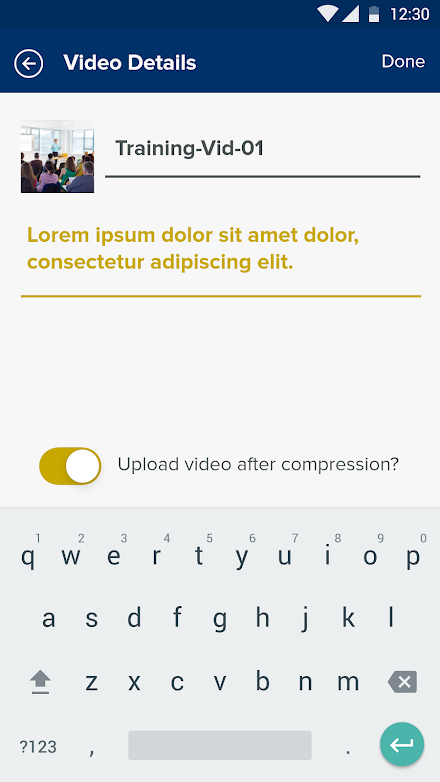
Features: - Record videos and upload directly to your NISL portal account- Upload videos from your Android device library- Stitch multiple videos together into a single video- Save videos to upload later for sharing, tagging, feedback, and annotationNCEE EZ Share uses automatic video compression for fast uploads and integrates seamlessly into the NISL portal platform.Video recorder and uploaderUse the video recorder within the app for simple, quick, and completely secure uploading directly to your NISL portal account.
Upload videos from your own device libraryWant to share videos you have recorded outside of the app?
Simply select a video from the video library on your Android device.Video stitcherYou can select multiple clips from within the app and from your device to combine videos together for uploading as a single video.
Save videos to upload laterThere is no need to upload videos as soon as you create them.
Your videos automatically save within the EZ Share app so you can upload them later, ready for sharing, tagging, feedback, and annotation.Automatic compression for faster video uploadsSuper fast upload times – the app automatically compresses your videos before uploading them to your NISL portal > TOOLS > Video Annotation.Integrates seamlessly into the NISL portal platformNCEE EZ Share seamlessly integrates with the NISL portal platform.
This makes it even easier to get feedback on your practice.
Record videos on the go, tag key moments, and securely share with colleagues, your NISL facilitator, and adviser; embed videos in your Action Learning work; and benefit from a cycle of continuous improvement in what you do.
About NCEE EZ Share – Video Recordin
- Package name (App ID)
- com.ncee.capture
- Available on
- Google Play
- Price
- Free
- Developer
- VEO App
Looking for the NCEE EZ Share – Video Recordin APK?
The safest way to get NCEE EZ Share – Video Recordin (com.ncee.capture) on your Android device is to install it directly from Google Play — you'll always get the latest official version, automatic updates, and no risk of modified or infected APK files from third-party sites.

Social Features
Connect and share with friends and the community.
Camera Features
Advanced camera features with editing capabilities.
Learning Tools
Enhance your learning experience with interactive features.
See NCEE EZ Share – Video Recordin in Action


Frequently Asked Questions
Is NCEE EZ Share – Video Recordin free?
Yes, NCEE EZ Share – Video Recordin is free to download and install on Android through Google Play.
How do I install NCEE EZ Share – Video Recordin on Android?
Open Google Play on your Android phone or tablet, search for NCEE EZ Share – Video Recordin by VEO App or tap the Google Play button on this page, then tap Install. The app downloads and installs automatically.
What is com.ncee.capture?
com.ncee.capture is the App ID (package name) of NCEE EZ Share – Video Recordin on Google Play. Every Android app has a unique package name, and it is the safest way to verify you are installing the official app.
Is NCEE EZ Share – Video Recordin safe to download?
Installing NCEE EZ Share – Video Recordin from Google Play is the safest option: you get the official version published by VEO App, verified by Google Play Protect, with automatic updates. Avoid APK files from unofficial third-party sites.

Get NCEE EZ Share – Video Recordin Today
NCEE EZ Share – Video Recordin for Android — free download on Google Play.
Compatible with Android phones and tablets — available on Google Play.
Ask AI about this app
Get instant answers about features, tips and more from popular AI assistants.